
How to connect an AI chatbot to Facebook Messenger

A Facebook Messenger chatbot needs three pieces: a Meta app subscribed to your Page's messages, a step that passes each message to your AI agent, and the Send API for the reply. Here is each step, plus the Messenger rules that catch people out.
A Facebook Messenger chatbot is three pieces joined together. Meta sends each message your Page receives to a webhook you control. Your code passes the text to an AI agent that knows your business. The agent's reply goes back through Meta's Send API using your Page's access token. Everything else is setup and policy.
Below are the steps from Meta's own Messenger Platform documentation, the rules that decide how your bot may behave, and the checks to run before you let it talk to customers. If you use a no-code connector or a platform with a built-in Messenger integration, the same pieces exist; someone else has wired them for you.
How a Messenger chatbot works
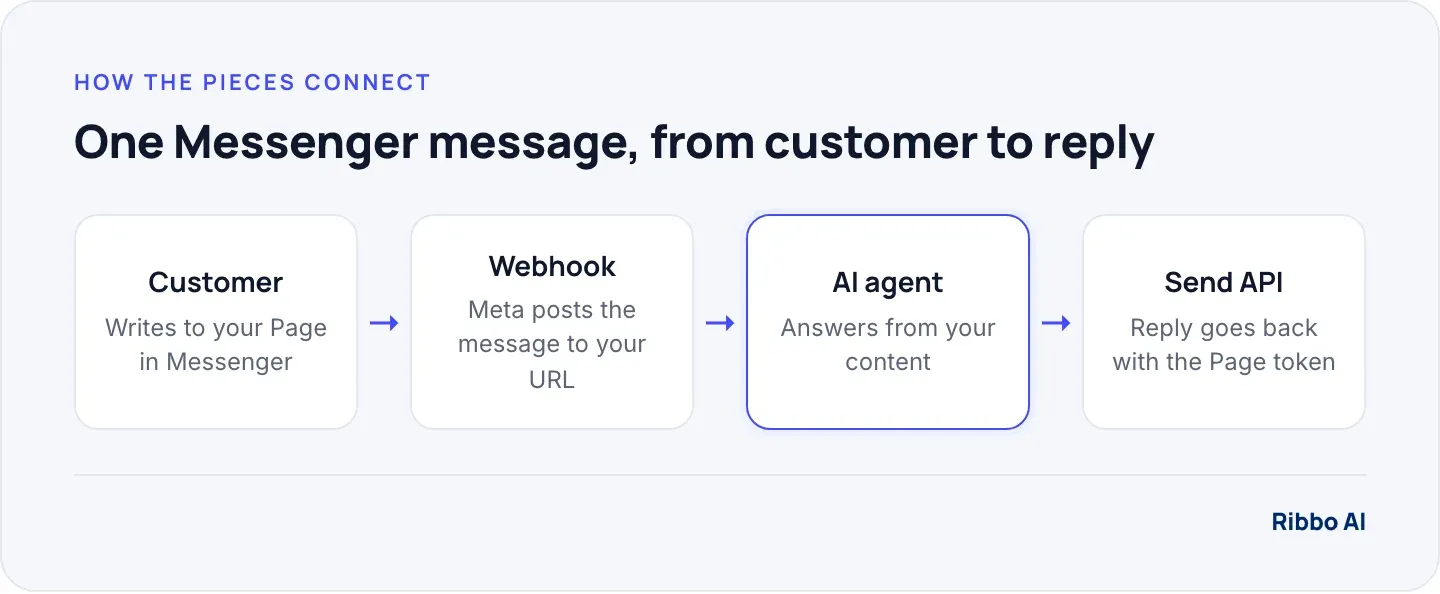
Every customer on Messenger is identified to your Page by a Page-scoped ID, the PSID. Treat it as the conversation key. Your middleware receives the message with that ID, sends the text and the ID to your agent so it can keep the thread together, and uses the same ID to address the reply.
The agent is the part that decides whether the bot is any good. A Messenger connection to a generic model gives you a generic bot. A connection to an agent trained on your own pages, prices and policies gives you answers your team would sign off.
Before you start, you will need
- Admin access to the Facebook Page, and the Page published.
- A Meta developer account and a business app in the Meta App Dashboard.
- A public HTTPS URL for the webhook. A small serverless function is enough.
- An AI agent you can call over an API, already tested on your real customer questions.
- A privacy policy URL, which Meta asks for when you submit the app for review.
Connect an AI chatbot to Messenger, step by step
1. Create the app and add Messenger
In the Meta App Dashboard, create a business app and add the Messenger product. Link your Facebook Page and generate a Page access token. Store it as a secret on your server, never in front-end code.
2. Set up the webhook
Enter your callback URL and a verify token you make up. Meta sends a GET request to check the endpoint: your code must confirm that hub.verify_token matches your string and respond with the hub.challenge value. Then subscribe the Page to the messages field, and to messaging_postbacks if you use buttons or a Get Started button. Subscribing needs the pages_messaging and pages_manage_metadata permissions.
3. Acknowledge fast, answer second
Meta expects a 200 OK within 5 seconds for every notification, and disables the webhook if deliveries keep failing for an hour. An AI reply can take longer than that, so acknowledge first and generate the answer in a background job or queue.
4. Pass the message to your agent
Send the message text and the PSID to your agent's API. Ignore echoes of your own outgoing messages, and keep a record of message IDs you have processed so a retried delivery is never answered twice.
5. Send the reply
Post the agent's answer to the Send API with messaging_type set to RESPONSE. Meta's example, on Graph API v26.0 at the time of writing, has this shape:
POST https://graph.facebook.com/v26.0/{PAGE-ID}/messages?access_token={PAGE-ACCESS-TOKEN}
{
  "recipient": { "id": "{PSID}" },
  "messaging_type": "RESPONSE",
  "message": { "text": "Late checkout until 1 pm is $25..." }
}
6. Test, then submit for app review
Test with accounts that have a role on the app first. Meta's app review page says the app must be reviewed before it is publicly available on Messenger. If any flow sits behind a login, give the reviewers a way in.
If your agent runs on Ribbo
Ribbo AI connects to Messenger as a built-in channel on the Growth plan and above, so you link your Page in the dashboard and skip the webhook and Send API code. If you would rather keep your own middleware, Ribbo agents can also be reached over an HTTP API, and steps 4 and 5 become one call to the agent and one call to Meta. The Ribbo integrations page explains how the agent connects to your channels and systems.
Messenger rules that shape your bot
These come from Meta's Messenger policy overview, and each one changes a design decision.
- The 24-hour window. You can reply freely, promotional content included, for 24 hours after most customer actions. After a Click-to-Messenger ad, the window can last up to 7 days. Outside it you need a message tag or another approved message type.
- The Human Agent tag. A person on your team can reply manually within 7 days. It exists for human replies, so do not route bot messages through it.
- Say it is automated. Where the law requires it, the bot must disclose that it is automated at the start of a conversation, after a long gap, and when a chat moves from a person to automation. Meta names California and Germany, and recommends disclosure everywhere. Putting "automated" in the assistant's name and first line covers most cases.
- Respond to everything. Automated bots must respond to user input within 30 seconds, including stickers, images and messages they do not understand. A polite fallback that offers a person counts.
Handing the conversation to your team
A Messenger chatbot needs a way out. Meta's conversation routing lets your app pass control of a thread to another app or to the Page inbox with pass_thread_control, and attach metadata such as a summary. Your team then replies from the inbox, and your app can take control back when they are done.
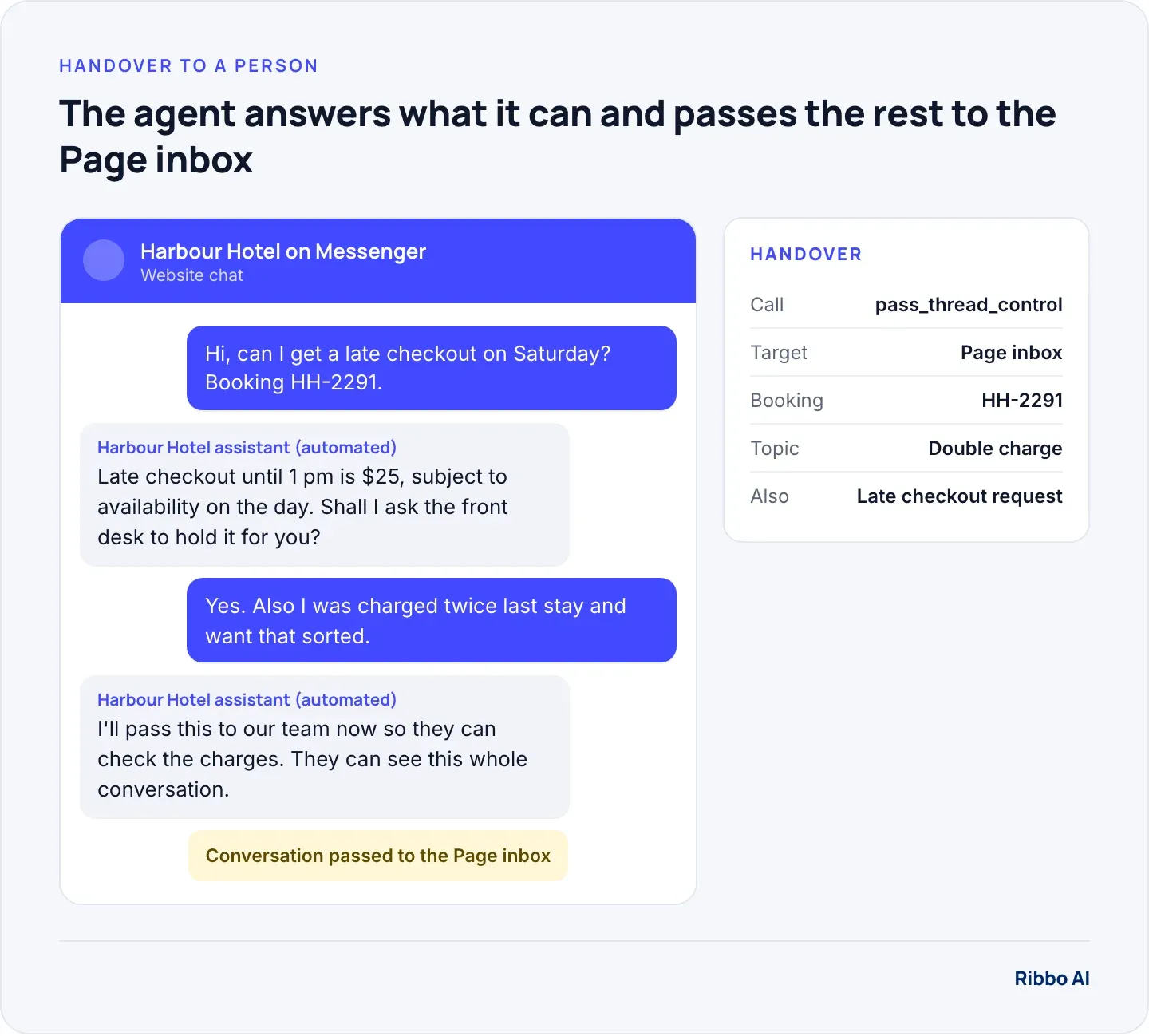
Decide where the line sits before launch. Billing disputes, complaints and anything involving a refund usually belong with a person. So does any customer who asks for one. Our glossary entry on human handoff covers the design choices.
Checks before you go live
- Send your 20 most common customer questions through Messenger and read every reply.
- Send an image, a voice note, a sticker and a thumbs-up. Each should get a sensible fallback.
- Ask for a person and confirm the thread lands in the inbox with the summary.
- Restart your webhook mid-conversation and confirm no message is answered twice.
- Check the bot says it is automated in its first message.
Where Ribbo fits
Ribbo AI is the agent in the middle of the diagram. It answers only from your website and the files you upload, replies in the language the customer writes in, and says when it does not know. The same agent can serve your website chat, WhatsApp, Messenger and Instagram, so adding Messenger does not mean a second knowledge base to maintain. To answer "where is my booking HH-2291" with the exact record, the agent reads it from your own system through an API Data Tool set up during onboarding; the integrations page covers how that connection works. When a customer asks for a person, the agent offers to bring one in and your team gets an email to follow up. Plans and channel limits are on the pricing page, and the platform page covers the rest.
Frequently asked questions
Do I need Zapier to connect a chatbot to Messenger?
No. Zapier or a similar tool can play the middleware role without code, which is handy for a test. For production, a small webhook service gives you control over retries, duplicate events and the 5-second acknowledgement.
Is a Facebook Messenger chatbot free?
The running costs on your side are the AI agent and whatever hosts your webhook. Sponsored and marketing messages outside the 24-hour window follow separate rules, so check Meta's current terms before planning any outbound use.
Can the same bot answer on Instagram?
Instagram messaging runs on a closely related Meta API with its own permissions and some differences in available features. Plan it as a second integration that reuses the same agent.
What happens if the AI does not know the answer?
It should say so and offer a person, never guess. Configure the agent to answer only from your content, and test with questions it should refuse. Our glossary entry on hallucination explains why this matters.