
Cost per ticket: how to measure it and bring it down with AI | Ribbo AI

Cost per ticket is simple to define and easy to get wrong. A worked calculation for an eight-person team, cost by ticket type, and an honest look at where AI lowers it and where it does not.
Cost per ticket is your total support cost for a period divided by the number of tickets resolved in that period. The formula fits on a sticky note. The work is in deciding what goes into the cost line, counting tickets the same way every month, and resisting the urge to treat one average as the whole story.
Below is a worked calculation for an eight-person team, the same team broken down by ticket type, and a plain look at where AI brings customer support costs down and where it does not.
The cost per ticket formula
Cost per ticket = total support cost in the period / tickets resolved in the periodUse resolved tickets, not created ones, and decide once how you count a ticket that is reopened or that moves between channels. If an email and a follow-up chat about the same order count as two tickets, your cost per ticket looks better than it is.
What to include in support costs
- Loaded labor. Wages plus payroll taxes, benefits and any bonuses for everyone answering customers. Use your payroll figures, not salary alone.
- Supervision. Team leads, quality reviewers and the share of a manager's time spent on support.
- Software. Helpdesk seats, telephony, chat tools, AI usage, the knowledge base.
- Hiring and training. Recruitment fees and the weeks a new hire is paid before they are productive, spread across the year.
- Outsourcing. Any overflow or out-of-hours provider.
- Space and equipment, if you want a fully loaded figure. Many teams leave these out; be consistent either way.
A worked example
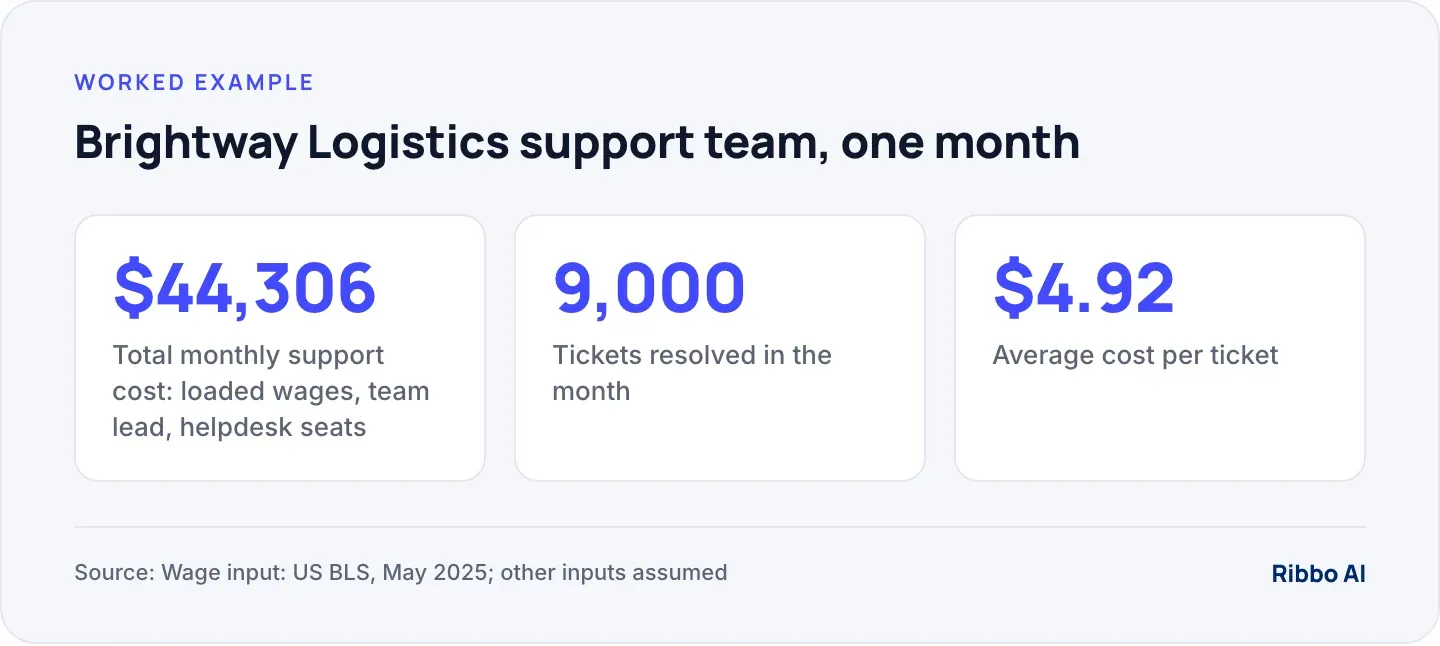
Brightway Logistics, a fictional parcel company, runs an eight-person support team handling email, chat and WhatsApp. All figures below except the wage are assumptions; replace them with yours.
- Wages. The US Bureau of Labor Statistics gives a median pay for customer service representatives of $21.53 an hour (BLS Occupational Outlook Handbook, May 2025). Eight full-time agents at 2,080 hours a year: 8 × 2,080 × $21.53 = $358,259 a year, or $29,855 a month.
- Loaded labor. Assume taxes and benefits add 30%: $29,855 × 1.3 = $38,811 a month.
- Team lead. Assume $5,000 a month loaded.
- Software. Assume 9 helpdesk seats at $55: $495 a month.
- Total: $38,811 + $5,000 + $495 = $44,306 a month.
- Tickets resolved: 9,000 a month.
Cost per ticket: $44,306 / 9,000 = $4.92.
Our ROI calculator runs this sum with your own team size, wages and volumes, and shows what changes when part of the volume moves to an AI agent.
Why the average misleads
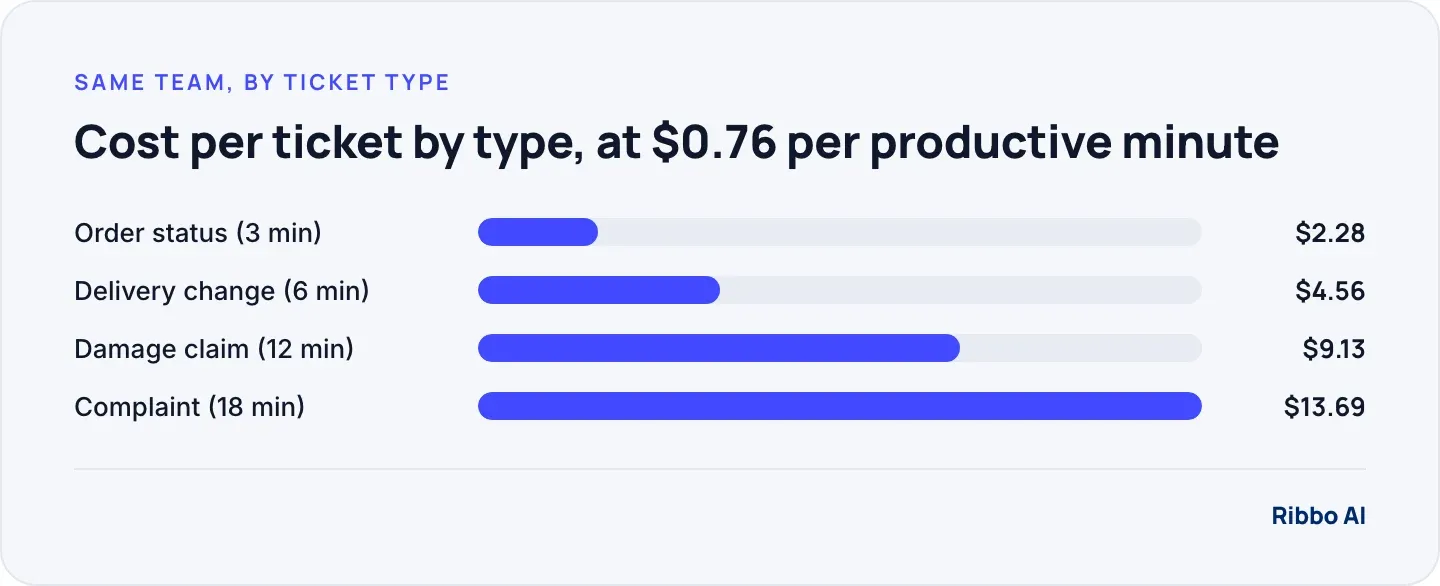
An average of $4.92 treats a two-line order status reply the same as a 20-minute complaint. Break it down by ticket type using handle time and you see where the money goes.
First, work out what a productive minute costs. Agents are not answering tickets every paid minute: breaks, training, meetings and absence take a share, known as shrinkage. Assume 30%. Each agent works about 173 hours a month, so the team has 8 × 173.3 × 60 × 0.7 = 58,240 productive minutes. $44,306 / 58,240 = about $0.76 a minute.
Multiply by the average handle time of each type. Brightway's month, with assumed volumes:
| Ticket type | Volume | Minutes | Cost each |
|---|---|---|---|
| Order status | 4,000 | 3 | $2.28 |
| Delivery change | 3,000 | 6 | $4.56 |
| Damage claim | 1,400 | 12 | $9.13 |
| Complaint | 600 | 18 | $13.69 |
The four types add up to 57,600 minutes, close to the team's capacity, which is the check that the inputs hang together.
Where AI lowers cost per ticket
Taking the repeat questions entirely
Order status is the biggest line by volume and the cheapest by unit. It is also the easiest for an AI agent, provided the agent can read the actual order rather than guess. Suppose the agent resolves 3,000 of the 4,000 order status tickets. That frees 3,000 × 3 = 9,000 agent minutes, about 15% of the team's productive time, or roughly 1.2 agents. At $4,851 of loaded labour per agent per month, that is about $6,000 of agent time a month. From that, subtract what the AI costs you, and check how your vendor counts usage before you do.
Shortening the tickets people still handle
When the agent collects the order number and the details of the damage before a person picks the conversation up, the damage claim starts at minute three instead of minute zero. If your team reads the full conversation before replying, the "can you tell me again" stage drops out of every escalated ticket.
Clearing the overnight backlog
Messages that arrive overnight and get answered by the agent never become a morning queue, which reduces the overtime and the rushed replies that cause repeat contacts.
Where AI does not lower costs
- Low volume. A team handling 300 tickets a month has little repetition to automate.
- Unique, judgement-heavy work. Complaints, claims and negotiations need people. An agent can gather details, not make the decision.
- Answers locked in systems the agent cannot reach. Without a connection to the order system, "where is my order" still lands with a person.
- A bad bot. If customers loop, give up and email instead, you pay twice. Repeat contacts are the number to watch; our post on where AI helps and hurts the customer experience covers the failure modes.
Customer service cost reduction that holds
Savings show up as capacity first. The team that used to drown in order status questions now has time for claims and complaints, or you avoid the next hire as volume grows. Treat the freed hours as the result, and measure satisfaction and repeat contacts alongside cost so a cheaper ticket is not a worse one. Our Erlang calculator helps translate the new volume into staffing.
Where Ribbo fits
Ribbo AI takes the repeat questions. With a Data Tool set up for your order system, "where is my order" is answered from the order itself rather than from a help article. When a conversation needs a person, your team gets an email and follows up, and every conversation is readable in the Ribbo dashboard, so you can review which ones the agent handled and which reached your team when you split the cost calculation. Start with the ROI calculator, then test the agent on your own questions.
Frequently asked questions
What is a good cost per ticket?
There is no universal figure, because channel mix, ticket complexity and wages vary so much. Compare yourself with your own past months and track cost by ticket type. A falling cost with stable satisfaction is the goal.
Should I include AI costs in cost per ticket?
Yes. Add the AI platform cost to the top line and count AI-resolved conversations as tickets, so you have one cost per contact across people and AI. Then report the human-handled cost separately.
How do I measure handle time for email and chat?
Most helpdesks record the time an agent has a ticket open. For chat, use active time on the conversation, not the time from first to last message, which includes the customer's waiting and typing.
How quickly do AI savings show up?
Volume moves in the first weeks once the agent is live and connected to your order data. The cost shows up when you staff to the new volume, through hiring you avoid or overtime you stop paying.