
ChatGPT for small business: what to hand it and what to keep | Ribbo AI
ChatGPT can take a lot of writing and admin off a small business owner. It cannot quote your prices, check an order or answer customers on your behalf. Here is how to split the work.

ChatGPT can take a lot of writing and admin off a small business owner. It cannot quote your prices, check an order or answer customers on your behalf. Here is how to split the work.
ChatGPT for small business is at its best on the work that lands on the owner's desk after hours: the job advert, the reply to a two-star review, the email chasing a supplier, the first draft of a returns policy. You read what it writes, fix two lines and send it. That alone can give back several hours a week.
It is at its worst when it speaks for you. It does not know your prices, your stock, your delivery zones or the customer who is asking, and it will still answer as if it does. The useful question is which jobs to give it, which to keep, and which need a different tool.
Jobs a small business can hand to ChatGPT today
Each of these has one thing in common: a person reads the output before anyone else sees it.
- Review replies. Paste the review and two facts about what happened. Ask for a reply under 60 words that thanks them, owns the problem and offers a next step.
- Product and service descriptions. Give it the specs and the customer you sell to, then ask for three versions. Keep the one that sounds like you and cut the adjectives.
- Job adverts and interview questions. A clear advert for a part-time shop assistant takes ten minutes instead of an evening.
- Supplier and landlord emails. Firm, polite, short. Useful when you are annoyed and should not write the first draft yourself.
- Spreadsheet help. Describe the columns and ask for the formula. Test it on five rows before trusting it on five hundred.
- Policies and checklists. A first draft of an opening checklist or a refund policy, which you then check against what you actually do.
- Translation. A reasonable first pass for a customer who writes in a language you do not speak.
A prompt that works for most of these:
You are writing for Acme Home, a homeware shop with two staff. Here is the situation: [provide business context here]. Write a reply under 80 words. Use only the facts I gave you. If something is missing, write "I am unable to provide a response for that. Please reach out to customer care on these lines for verification..." instead of guessing.
The last line is the habit worth building. Telling the model what to do when it lacks a fact stops most of the invented detail before it appears.
What ChatGPT cannot run for you
The limits all come from the same place. ChatGPT knows a lot about the world in general and nothing about your business unless you paste it in every time.
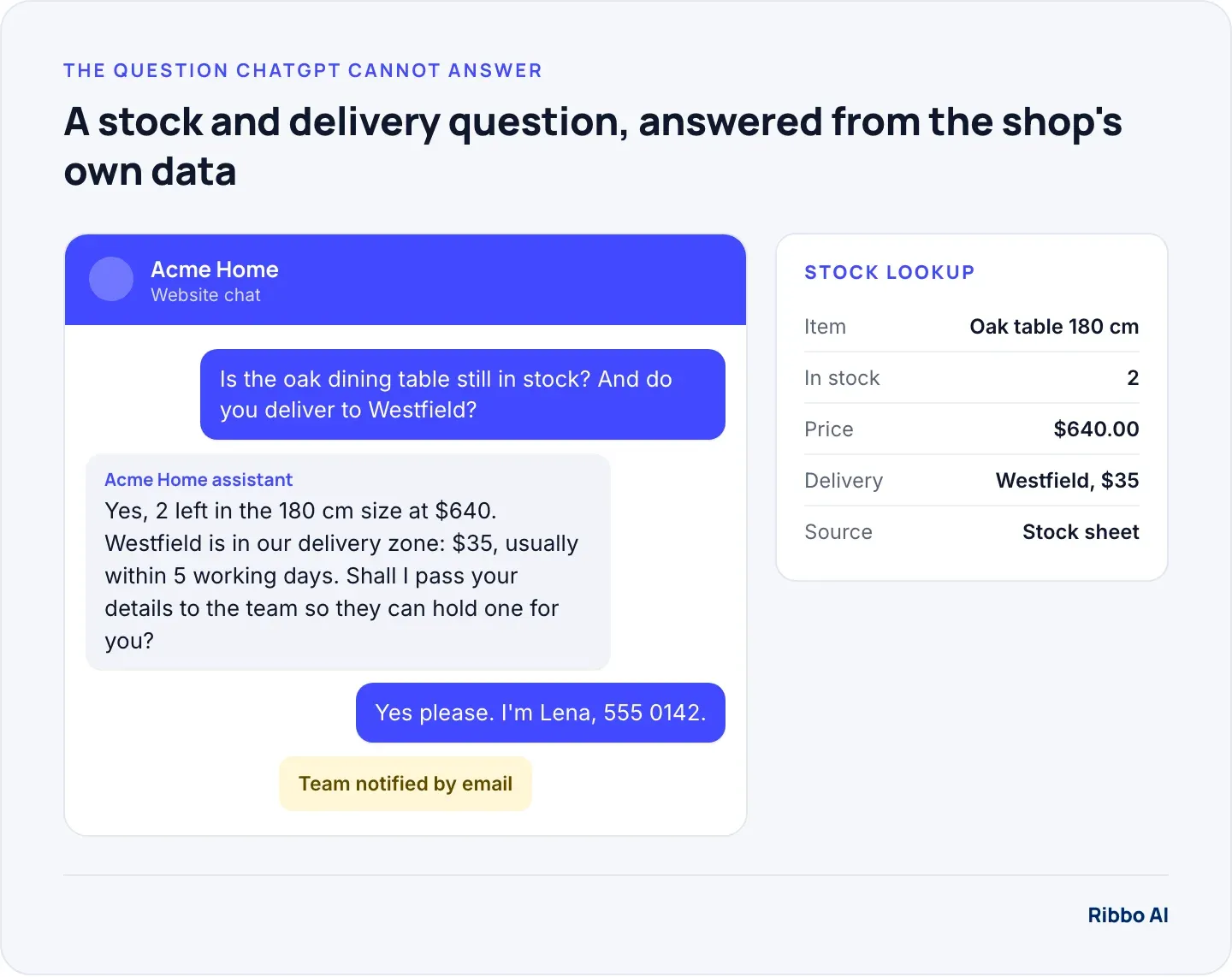
- Your prices and stock. Ask it whether the oak table is in stock and it has no way to know. Ask what delivery costs and it will offer a typical figure, which is not your figure.
- The customer in front of you. "Where is my order?" needs the order. ChatGPT cannot see your shop system, your booking calendar or your invoices.
- Your current policies. Change your returns window from 30 days to 14 and ChatGPT will not know unless you tell it again.
- Anything that needs doing. Reserving the table, booking the appointment, taking the deposit. It can describe how, but someone still has to do it.
Putting a general chatbot in front of customers anyway has a known cost. In 2024 a Canadian tribunal ordered Air Canada to pay a passenger $812 after its website chatbot described a refund rule that did not exist, and found that the airline was responsible for what its chatbot said, as CBC News reported. A small business has less room to absorb that than an airline.
AI for small business: three levels, three jobs
Most of the confusion about AI for small business comes from treating these as one thing. They are separate tools for separate jobs.
- ChatGPT as your assistant. You ask, it drafts, you check. Covered above.
- An AI chatbot for small business trained on your content. It answers customers on your website or WhatsApp from your own pages, price lists and policies, and says when it does not know.
- An agent connected to your records. The same, plus live lookups: stock, order status, bookings. It gives the exact figure and tells you when a customer is ready to buy.
The grid below is a quick way to decide which level a job belongs to. Plot each question your customers ask by how often it comes up and what a wrong answer would cost you.
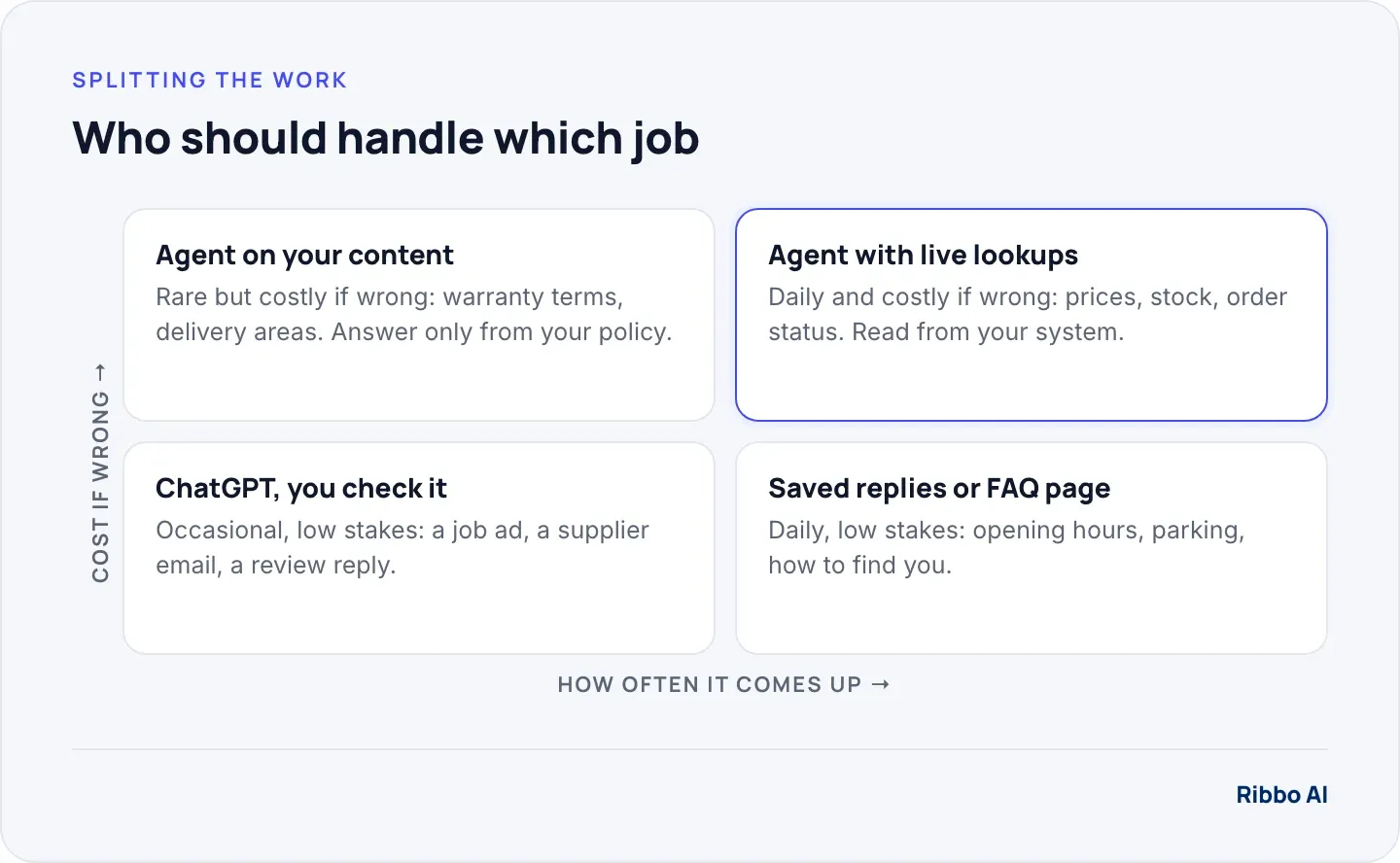
The bottom row rarely needs AI at all. A saved reply or a clear FAQ page answers "what time do you close" well enough. Our free canned responses library covers the common ones. The top row is where a customer-facing agent earns its place, because the answer has to be your answer.
A worked example: one month of customer messages
Take a homeware shop like Acme Home with this month's inbox. These numbers are illustrative; count your own before deciding anything.
- 400 customer messages across web chat, email and WhatsApp.
- About 3 minutes each to read, look something up and reply.
- 400 × 3 = 1,200 minutes, or 20 hours of someone's month.
Now sort the messages. Say 240 of them are versions of five questions: is it in stock, what does delivery cost, where is my order, can I return this, when are you open. ChatGPT could help draft replies to all 400, but someone still has to look up the stock and the order for each one, so the 20 hours shrink only a little.
An agent that reads the stock sheet and the order list can answer most of those 240 by itself, around the clock, and email you about the rest so you can follow up. That is the difference between saving typing and saving the job. Our ROI calculator runs the same sum with your own numbers.
Keep customer data out of personal ChatGPT accounts
When you paste a customer's complaint into ChatGPT, you are sharing their details with OpenAI. How that content is used depends on the account. OpenAI's data use policy says content from individual accounts may be used to improve its models unless the user turns that off in settings. Its business products, including ChatGPT Business and the API, are not used for training by default, per its enterprise privacy page.
Two simple rules cover most small businesses. Strip names, phone numbers and card details before pasting anything. And if staff use ChatGPT for work, give them a business account or switch off training on the accounts they use.
When a trained agent is the better fit
ChatGPT on its own is enough if your customers mostly phone, or if the questions you get are varied and rare. A trained agent starts to pay for itself when these are true:
- The same ten questions make up most of your messages.
- Customers write outside opening hours and you lose sales by replying the next morning.
- The answers live in a price list, stock sheet or booking system you already keep.
- You want every enquiry written down somewhere you can follow up, instead of scattered across your phone.
Where Ribbo fits
Ribbo AI is the second and third level above. You give it your website, documents and price lists, and it answers customers on your website, WhatsApp, Messenger and Instagram in the language they write in. It answers only from the sources you gave it and says when it does not know. With a Data Tool set up on an uploaded stock sheet or your shop system's API, it looks up stock and orders, and when a customer needs a person it emails your team so you can follow up. Every conversation is readable in the dashboard.
At the time of writing (October 2026), the Free plan gives you one agent and 30 message credits to test it on your own questions. Starter is $20 a month for 1,000 credits, and Growth at $50 a month adds WhatsApp, Messenger and Instagram integrations. The full breakdown is on the pricing page.
Frequently asked questions
Is ChatGPT free for small business use?
There is a free ChatGPT tier, and it is enough for occasional drafting. The catch is privacy: on individual accounts your content may be used for training unless you switch that off. A business account is the safer choice once staff use it every day.
Can ChatGPT answer my customers on WhatsApp?
Not by itself. You need the WhatsApp Business Platform connected to an agent that holds your content and rules. Our WhatsApp page explains how Ribbo runs on your own number.
How long does it take to train a chatbot on my business?
Loading your website and a price list takes minutes. Checking the answers takes longer and matters more: ask it your 20 most common questions, fix the gaps in your content, and repeat until the answers are right. Plan for a few sessions over a week, not an afternoon.
What is the difference between ChatGPT and an AI agent?
ChatGPT is a general assistant you talk to. An AI agent is set up for one business: it answers from that business's content, can look up exact records, and brings in a person when needed. The glossary entry on AI agents versus chatbots goes further.